Structure Analysis
Document Layout
DocMorphix analyzes page structure, margins and paragraph relationships to recreate a natural reading and editing flow in Word.
Turn complex documents into editable Word files with AI-powered OCR that reconstructs text, tables, equations, figures and layouts.
Or click to browse files (supports multi-page PDFs & images)
Your documents stay confidential
Files are processed securely and deleted immediately after conversion. All data is encrypted in transit and at rest.
See how DocMorphix reconstructs complex document content into editable Word documents.
Convert detected tables into structured, editable content instead of flattened text.
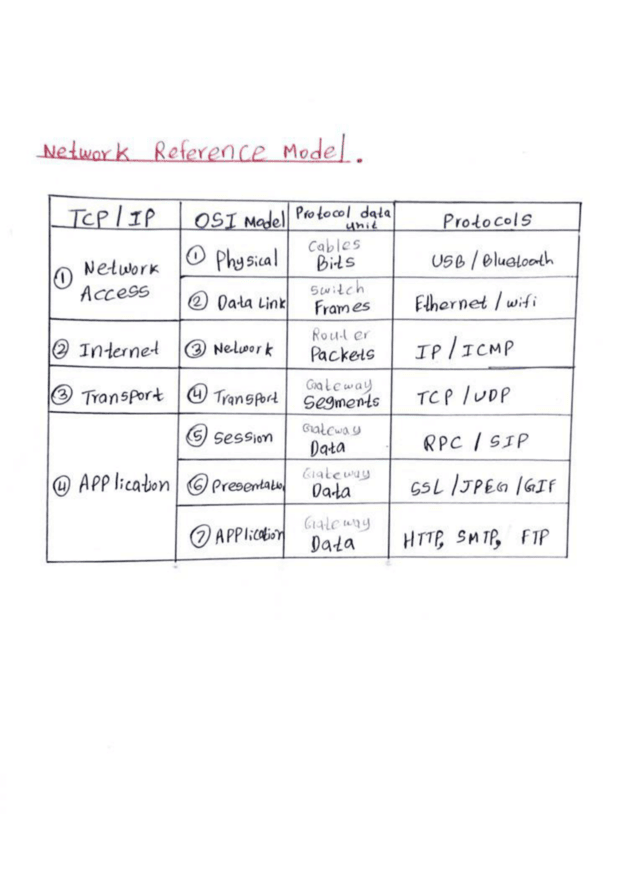
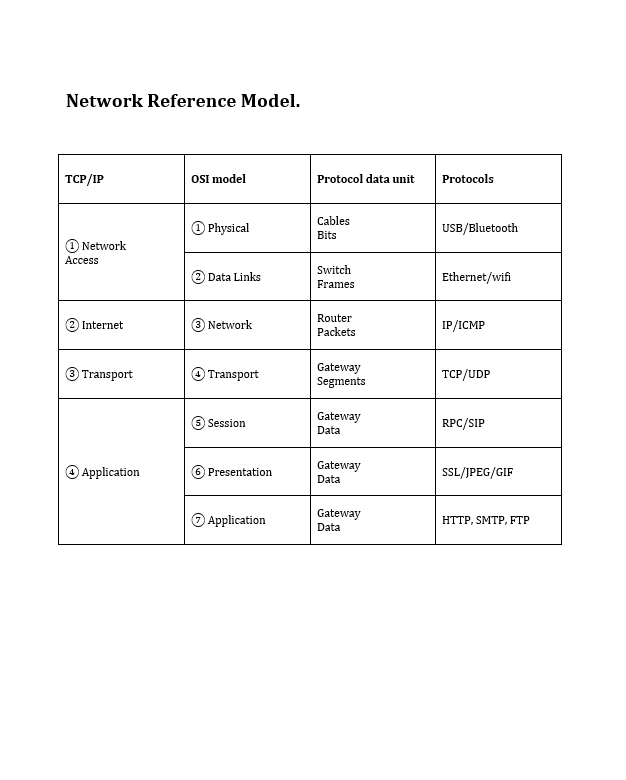
Basic OCR tools often extract text but lose the structure that makes a document usable. DocMorphix analyzes the document's content and layout to reconstruct an editable Word file, giving you a strong starting point instead of rebuilding the document from scratch.
DocMorphix analyzes page structure, margins and paragraph relationships to recreate a natural reading and editing flow in Word.
Detected tables are reconstructed into true, editable Word tables with rows, columns, and cell borders rather than dumped as disconnected lines of text.
Mathematical expressions and scientific formulas are recognized and recreated in the output document, saving hours of manual equation typesetting.
Visual document elements, diagrams, and illustrations are identified and incorporated appropriately into the reconstructed Word document structure.
DocMorphix handles image-only PDFs, scanned paper, and photographed documents that do not contain selectable text, applying AI OCR for text extraction.
Instead of a flattened export or plain text dump, you receive a standard editable .docx document ready to open, edit, and format in Word or Google Docs.
“I’m very satisfied with DocMorphix. It converts JPG images into editable Word documents very accurately and saves me a lot of time. I’ve previously used online tools such as iLovePDF and Smallpdf, but I’ve found DocMorphix’s conversion accuracy to be much better.”
Turn a PDF, scanned document or image into an editable Word file in minutes.
Upload a PDF, scanned document or image in a supported format.
OCR and AI document analysis identify text, tables, equations, figures and layout to reconstruct the document.
Download the reconstructed DOCX and make any final edits you need.
Basic PDF converters and OCR tools can lose document structure. DocMorphix analyzes the content and layout to reconstruct a more useful, editable Word document.
Turn scanned contracts, agreements and forms into editable Word documents without retyping them from scratch.
Reconstruct research papers and technical documents containing mathematical equations, tables and structured content.
Convert reports, financial statements and data tables into structured, editable Word content.
Bring archived documents, old records and photocopies back into an editable digital format.
Recreate an editable Word document from an existing PDF or scanned copy when the original DOCX is no longer available.
Convert JPG, PNG and other supported document images into editable Word files using OCR and document reconstruction.
Everything you need to know about DocMorphix document reconstruction, OCR, and Word export.
Yes. DocMorphix uses AI-powered OCR and document reconstruction to convert scanned PDFs, including pages without selectable text, into editable Microsoft Word (.docx) documents.
Upload a PDF, scan or document image and let DocMorphix reconstruct the content for editing.